Showing posts with label host software. Show all posts

Thursday, 10 November 2011

New Megas

My new Mega boards arrived - all good.
Simple tests worked fine, but after uploading the RepRap host software at 115200 Baud, had problems connecting and even uploading new sketches. I had to press reset and upload almost straightaway, otherwise the upload failed.

A bit of research suggested an updated Atmega 8u2 firmware (the usb chip). (also the new boards appear as /dev/ttyASM0 instead of /dev/ttyUSB0 - update to the latest RXTX libraries.

Borrowed from a forum post by stimmer on this thread

I saw that a new Uno firmware had been uploaded to the Arduino repository. I've been trying it out, it seems pretty good so far, tools menu and serial monitor are much more reliable and it only failed to program once. (Although the Duemilanove was never perfect either)

I got the firmware from here:
https://github.com/arduino/Arduino/tree/master/hardware/arduino/firmwares/arduin...(click on the right firmware, then click raw, then save it)

Reflashing the firmware on the 8u2 is a little tricky. Don't try this unless you are prepared to risk bricking your board completely!

You need the dfu-programmer utility:
sudo apt-get install dfu-programmer

Then follow the instructions here to get the Uno into DFU mode:
http://www.arduino.cc/cgi-bin/yabb2/YaBB.pl?num=1285962838/10#10

Then to flash the firmware, do this:
sudo dfu-programmer at90usb82 erase
sudo dfu-programmer at90usb82 flash --debug 1 Arduino-usbserial-uno.hex
sudo dfu-programmer at90usb82 reset

Finally unplug the USB plug, wait a few seconds, plug back in.


Also, a good page on the arduino site

Note, that to put reset the Mega 8u2 chip, the reset pins are a bit different: I found instructions for resetting the mega chip.
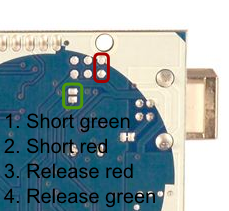

My mega's accepted the sketches without problem, and both replicatorG and RepRap host connect well at 115200 baud.

Might help if you're getting unreliable high-speed connections to the arduino and you've got a recent board (/dev/ttyACM0)

Saturday, 19 June 2010

RepRap host software on Mac

Just a quick note to anyone trying to get the RepRap host software to run on a new Mac (Mac OSX 10.6.3).
I downloaded the software from the wiki and unzipped it.

To get it to work, I had some problems trying to make it accept a classpath. Eventually I did the following:

Make a directory ~/Library/Java/Extensions
Copy any files with *.jar and *.jnilib extensions to that directory.

The librxtxSerial.jnilib file supplied in the reprap software didn't seem to work. I found one at
http://iharder.sourceforge.net/current/java/ and I replaced it with this newer one.

Go to the reprap host software directory in a terminal window (you need to be in a directory with the rr-logo-green-url.png file in it).

type 'java org.reprap.Main'

This brings up the main reprap windows on my mac, and I was able to load and slice a .stl file. YMMV :-)

UPDATE:
As pointed out by Tony, this is not the most elegant solution. It doesn't help that I was looking at the 'mac-experimental' version from last year, rather that re-building from source :-( oops.

I also found out why I was having problems with the classpath :
java org.reprap.Main -cp $CLASSPATH 
is NOT equivalent to
java -cp $CLASSPATH  org.reprap.Main 

Doh!
This is usually true of any other command-line program, but any arguments AFTER the classname are passed to the class Main() method. I blame late-night programming :-)
Ignore all the java/extension rubbish, just use instructions from
http://tonybuser.com/reprap-host-on-osx-snow-leopard

A command line that also works is
 java -cp "*" org.reprap.Main