Showing posts with label firmware. Show all posts

Thursday, 10 November 2011

New Megas

My new Mega boards arrived - all good.
Simple tests worked fine, but after uploading the RepRap host software at 115200 Baud, had problems connecting and even uploading new sketches. I had to press reset and upload almost straightaway, otherwise the upload failed.

A bit of research suggested an updated Atmega 8u2 firmware (the usb chip). (also the new boards appear as /dev/ttyASM0 instead of /dev/ttyUSB0 - update to the latest RXTX libraries.

Borrowed from a forum post by stimmer on this thread

I saw that a new Uno firmware had been uploaded to the Arduino repository. I've been trying it out, it seems pretty good so far, tools menu and serial monitor are much more reliable and it only failed to program once. (Although the Duemilanove was never perfect either)

I got the firmware from here:
https://github.com/arduino/Arduino/tree/master/hardware/arduino/firmwares/arduin...(click on the right firmware, then click raw, then save it)

Reflashing the firmware on the 8u2 is a little tricky. Don't try this unless you are prepared to risk bricking your board completely!

You need the dfu-programmer utility:
sudo apt-get install dfu-programmer

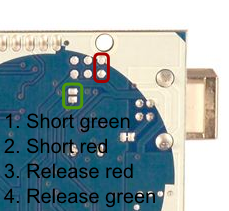
Then follow the instructions here to get the Uno into DFU mode:
http://www.arduino.cc/cgi-bin/yabb2/YaBB.pl?num=1285962838/10#10

Then to flash the firmware, do this:
sudo dfu-programmer at90usb82 erase
sudo dfu-programmer at90usb82 flash --debug 1 Arduino-usbserial-uno.hex
sudo dfu-programmer at90usb82 reset

Finally unplug the USB plug, wait a few seconds, plug back in.


Also, a good page on the arduino site

Note, that to put reset the Mega 8u2 chip, the reset pins are a bit different: I found instructions for resetting the mega chip.


My mega's accepted the sketches without problem, and both replicatorG and RepRap host connect well at 115200 baud.

Might help if you're getting unreliable high-speed connections to the arduino and you've got a recent board (/dev/ttyACM0)

Sunday, 4 September 2011

One step forward...

I spent the last couple of days fiddling with software and firmware.
I started with the 'official' RepRap host and firmware, but since I've got a complete mix of electronics (single Arduino mega, self-designed mega shield, separate extruder boards (X,Y, Z, E) and custom heater board), I needed to update all of the pin assignments and configuration files.

I made reasonable progress, managed to get the XYZ axes working fine, but it refused to turn the extruder stepper. I tried various things, ( including heating extruder to 200C), but it refused to move.
I then tried to get the latest host / firmware from git, but while doing this managed to mess up my java3d configuration slightly. Now, all I get is :

DEBUG: Attempting to initialize Arduino/Sanguino [0.174s/87ms]
Exception in thread "J3D-Renderer-1" java.lang.UnsatisfiedLinkError: javax.media.j3d.NativeScreenInfo.openDisplay()J
        at javax.media.j3d.NativeScreenInfo.openDisplay(Native Method)
        at javax.media.j3d.NativeScreenInfo.getStaticDisplay(NativeScreenInfo.java:48)
        at javax.media.j3d.NativeScreenInfo.isGLX13(NativeScreenInfo.java:36)
        at javax.media.j3d.NativeConfigTemplate3D.getBestConfiguration(NativeConfigTemplate3D.java:67) 
... 
I've tracked this down to a missing j3d*.so file. I have tried a number of things (setting LD_LIBRARY_PATH, java.library.path, putting the .so files in the current directory, etc) but there is also a problem with 64/32bit libraries. Downloading latest versions of the libraries, etc also didn't help :-(. I think it is more subtle than just missing the .so file in the path.

I switched to use replicatorG - nice program - but the 5d firmware still didn't move the extruder (after fixing some baud rate problems).

Finally, I updated to the 'Sprinter' firmware - slightly easier to configure - and this, in conjunction with the ultimaker version of replicatorG, allows me to move the extruder stepper!! woohoo!

Now, to test the heater/extruder, configure the parameters, connect up the axes...

Edit:
Oops. Nothing to do with firmware problems, just some dodgy intermittent connections on my stepper. Unplugging the mega during the firmware 'upgrade' wobbled the wire, making it work the next time...
Nothing to do with the firmware versions!!!
Saturday, 30 May 2009

Hacked Firmware for simple encoder

I've started hacking the firmware to add support for my simple speed controller.

Current version is here:

http://sites.google.com/site/renoirsrants/reprap/software-i-use

Warning: this is straight off my development version. Read (and modify) before using.

speed 1 = fast
speed 255 = slowest

It *should* run encoder at a constant rate.