Sunday, 30 October 2011

Crimptastic!

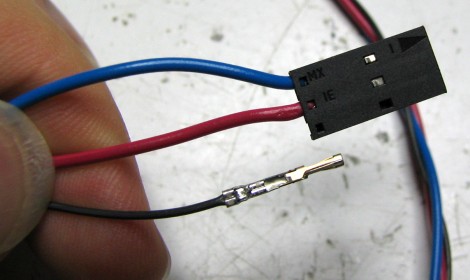
After a few days, my new crimping toys tools arrived in the post. Here's a joint from a couple of years BC (Before Crimptool) :
First attempt at crimp connectors
However, that was before the RVFM HT-225D, which I got from Rapid.
RVFM HT-225D
It has the correct 'B' shaped jaws to make proper crimp joints:
B-shaped jaws
To use this effectively, you need a set of crimp pins, and you need to carefully strip and trim the wire, like this :
Trimmed wire
Then you need to insert a crimp pin into the appropriate jaws - note you don't always need to remove them from the strip, I found them easier to handle by bending a single pin away from the strip.
crimp socket inserted
Then, insert the wire : I marked a small dot with a sharpie to mark the appropriate depth:
Ready to crimp
Pull the handles together until they're all crimped - rinse and repeat:
four pins in two minutes
So much easier and more efficient than the manual pliers/solder method. They're not 'perfect' yet - according to the spec I've got a little too much insulation in there - but it's a damn sight neater than my first attempts a couple of years ago :-).
Completed Plug :
Completed plug

Friday, 21 October 2011

Greetings fellow b3tans!

Amazing! 3-d printing is now officially mainstream - it's appeared in B3TA!

Thursday, 20 October 2011

Crimpin' - my style

I must admit I wasn't that familiar with crimping before starting my RepRap. For the uninitiated, it's the method of attaching the wires to the various plugs to connect to the PCBs. The main connections are the 4-pin stepper motors and the 3-pin headers for the endstops. I also use a 3-pin connector for the thermistor sensor.


The connector consists of some metal pins with tabs, and the tabs are crimped onto the wires. The metal pins then fit into a plastic housing that makes the plug.
My early attempts involved squishing a bare wire between the tabs with some pliers. However, some of my crimped joints were not well attached: sometimes the pins would deform, so they didn't fit into the housing properly, and often the wire would either fall out, or I'd end up breaking some of the wire strands. I usually ended up squishing and then trying to solder them, often also melting the insulation.
This caused a recent problem where my extruder stepper was not moving - I thought it was due to the firmware, but it was actually a failing stepper connection - two of the wires had bad, intermittent connections.

Using my obsession to understand every part of my 'rap, I did some digging. Mr Nophead had an excellent video which solved my immediate problems :-


Looking a little deeper, there are a multitude of articles on the subject : this article on pinball repair has an excellent overview and good advice. The *key* point seems to be using the proper tools. Using the proper crimping tool makes a good crimp joint easy. The Society of Robots tutorial also has a clear guide, and even our own RepRap forum had a useful discussion.

Time to bite the bullet and get a proper tool. Although you can spend over a hundred pounds on a crimping tool, every manufacturer has a slightly different tool, several different sizes and styles, and most are expensive.
After a bit more research, I found that the 'cheap' (<£15) muti-size crimping tools are only useful for automobile connectors (anything with three coloured dots on it - they are too large),  'bootlace ferrules' crimpers are also not suitable (wrong shape), and the telephone/RJ45 crimping tools are special. The 'molex' and other open crimping terminal styles we use are a lot smaller, typically described using wire gauges, e.g. 22-24AWG of 24-28AWG. However, I did find one reasonably cheap well-reviewed tool - the Multicomp HT225D - available from Rapid(£20) and Farnell(£37). The correct tools have a small 'B' shaped indent, which bends the tabs back on themselves to tightly hold the wire. A properly crimped joint does not need soldering and is more than strong enough for RepRapping connections.

Also worth noting is the huge variety of crimping pins, housings, gold/brass/tin platings, and huge number of options when you go looking to buy connectors. Note that certain pins fit certain housings - you need to make sure the pins, housings, sockets all come from the same range - there are a bewildering array - just see the molex site! The two Molex ranges I found most applicable to RepRapping were the KK range (cheap and cheerful, already used for the stepper and range sensors) and the SL range. Both are available in the 2.54mm (0.1 inch) pitch that the RepRap boards use for the endstops and I use for my steppers.
I personally prefer the SL crimping terminals (16-02-0088)- they look like they will connect better (holding from both sides) rather that the KK terminals that push one side against the housing. I also picked up some 3-way and 4-way housings for the terminals. According to the Molex site, they will use the 70058 range of pins, which include the 16-02-0088.
I went for the gold-plated terminals, as the header pins on my boards are already gold-plated, and the gold-plated terminals have a lifetime of 100 cycles (plugging and unplugging) - the tin ones only have 25 cycles. I also wanted some reasonably chunky wire for the steppers, so I got some 4-way 24AWG ribbon cable, which determined the size of the crimp terminals (22-24AWG) I needed.
I also picked up some male pins (16-02-0081) - so I can make some wire-to-wire connectors. Most of my wires have awful twisted and soldered bodges where they're connected together - covered with heatshrink when I remembered to put it on before soldering, and insulation tape when I didn't. I'd like to replace my bodges with proper pluggable connections, particularly with the stepper wires.

I hope this will fix my dodgy connection issues, and also will tidy my 'rap wiring up at the same time.
:-)

Sunday, 4 September 2011

One step forward...

I spent the last couple of days fiddling with software and firmware.
I started with the 'official' RepRap host and firmware, but since I've got a complete mix of electronics (single Arduino mega, self-designed mega shield, separate extruder boards (X,Y, Z, E) and custom heater board), I needed to update all of the pin assignments and configuration files.

I made reasonable progress, managed to get the XYZ axes working fine, but it refused to turn the extruder stepper. I tried various things, ( including heating extruder to 200C), but it refused to move.
I then tried to get the latest host / firmware from git, but while doing this managed to mess up my java3d configuration slightly. Now, all I get is :

DEBUG: Attempting to initialize Arduino/Sanguino [0.174s/87ms]
Exception in thread "J3D-Renderer-1" java.lang.UnsatisfiedLinkError: javax.media.j3d.NativeScreenInfo.openDisplay()J
        at javax.media.j3d.NativeScreenInfo.openDisplay(Native Method)
        at javax.media.j3d.NativeScreenInfo.getStaticDisplay(NativeScreenInfo.java:48)
        at javax.media.j3d.NativeScreenInfo.isGLX13(NativeScreenInfo.java:36)
        at javax.media.j3d.NativeConfigTemplate3D.getBestConfiguration(NativeConfigTemplate3D.java:67) 
... 
I've tracked this down to a missing j3d*.so file. I have tried a number of things (setting LD_LIBRARY_PATH, java.library.path, putting the .so files in the current directory, etc) but there is also a problem with 64/32bit libraries. Downloading latest versions of the libraries, etc also didn't help :-(. I think it is more subtle than just missing the .so file in the path.

I switched to use replicatorG - nice program - but the 5d firmware still didn't move the extruder (after fixing some baud rate problems).

Finally, I updated to the 'Sprinter' firmware - slightly easier to configure - and this, in conjunction with the ultimaker version of replicatorG, allows me to move the extruder stepper!! woohoo!

Now, to test the heater/extruder, configure the parameters, connect up the axes...

Edit:
Oops. Nothing to do with firmware problems, just some dodgy intermittent connections on my stepper. Unplugging the mega during the firmware 'upgrade' wobbled the wire, making it work the next time...
Nothing to do with the firmware versions!!!

Wednesday, 31 August 2011

Back on the horse!

After a long delay, I have finally got back to rewrapping!
I dusted off the darwin, tightened the bolts, and rubbed the rust spots off the rails (stored in the garage - not good!). A couple of the acrylic joints had cracked, and a couple of the cross-bracing rods had come off. I tided and reaffixed as best I can. I spent yesterday and today re-plugging the gen2 stepper driver boards into my gen3/Arduino mega setup, and then fixing the firmware for my custom setup.
While uploading the firmware, I was getting a lot of errors -
Binary sketch size: 28098 bytes (of a 126976 byte maximum)

avrdude: stk500_paged_load(): (a) protocol error, expect=0x14, resp=0xa7
avrdude: stk500_cmd(): programmer is out of sync

Although the upload still *seemed* to work, it was a little worrying. Occasionally, it would work OK, but almost every upload would report this error.
Checking the internet, one post mentioned interrupts causing problems. I know that interrupts are used in the firmware for stepper timing and extruder heater control. I found that if I uploaded the 'blink' sketch first (nice, short quick sketch) and then the firmware, it uploads successfully without any errors!
YMMV :-)

Sunday, 31 July 2011

Calibre, and Kindle, and books on the Calibre Webserver

Sad but true - I spent my friday night fiddling with PCs.

I've got a Kindle - an excellent reader - and a bunch of ebooks I've downloaded from Gutenberg. I already use Calibre to load the ebooks onto the kindle, but I liked the idea of accessing the library over my wifi network. Calibre has a built-in web server, on port 8080. (Also delete the calibre web username/password, and convert all your books to MOBI or LIT formats).

The Kindle browser is flawed though - it only connects over port 80 (HTTP) or 443 (S) :-(

I already had apache running on my main server (Giles) on port 80, so time for some tweaking:

I set up an alias for my server (in /etc/hosts/) :
127.0.0.1 localhost
127.0.1.1 giles

192.168.0.11 calibre.giles.local

# The following lines are desirable for IPv6 capable hosts
::1     ip6-localhost ip6-loopback
fe00::0 ip6-localnet
ff00::0 ip6-mcastprefix
ff02::1 ip6-allnodes
ff02::2 ip6-allrouters
192.168.0.11 is giles's static IP address. calibre.giles.local is my new virtual server name.

Added an apache conf file to use a virtual host (/etc/apache2/conf.d/calibre.conf):

ProxyPreserveHost On
ProxyPass / http://192.168.0.11:8080/
ProxyPassReverse / http://192.168.0.11:8080/
ServerName calibre.giles.local

This tells apache to route any traffic from calibre.giles.local to the calibre webserver (port 8080).

Now, using a browser on giles, I can see the calibre server by visiting http://calibre.giles.local

This works great, but only when I'm on giles - from any other machine, I would have to edit the 'hosts' file to add the DNS entry - and on the kindle that's not possible.

OK, more tweaking:

Installed dnsmasq (sudo apt-get install dnsmasq). This is a local DNS caching server - it caches the DNS records so it speeds up your browsing (fractionally) but more importantly, it also serves the local /etc/hosts file - so my new calibre.giles.local adress will be served to anyone using this DNS server.
Changed the /etc/resolv.conf:
nameserver 192.168.0.11
i.e. - get giles to use it's own dns server.

Changed /etc/dnsmasq.conf to add :
resolv-file=/etc/resolv2.conf
This avoids dnsmasq using itself to look up entries!

server=194.168.4.100
server=194.168.8.100
These are the two Virgin Media cable DNS servers (my ISP): I could also have used any public DNS servers.

Restarting dnsmasq (service dnsmasq restart) to pick up the changes, I can test this :
dig google.com 
gives me 9ms the first time, the 0ms the second - the cache is working.
dig calibre.giles.local 
shows 0ms - it is in the hosts file.

So, to make my entire network pick up the new DNS server: Login to my Apple Airport router, and go to IP (Internet) settings. Change the DNS list to have 192.168.0.11 first in the list.

All my other machines on the network use the airport router as the DHCP server and gateway/DNS proxy.

So:
Kindle connects to the wireless network - gets the DHCP address and a DNS server of 192.168.0.1 (the AirPort router).
Go to menu - experimental - web browser and type in "calibre.giles.local".
Kindle asks the airport router DNS for the address.
Airport router DNS asks Giles DNSmasq for the address. Found in local hosts file.

Kindle now displays the calibre web interface. You can search for books/authors, download and read any book (click on the MOBI file) :-)

Wednesday, 20 July 2011

VNC problems in ubuntu?

I've been using VNC to remote access my two Ubuntu Natty Narwhal machines, and having terrible trouble - the VNC screen not updating, to controlling properly, etc.

It looks like the 3D and special effects play havoc with the VNC server - not displaying properly, etc.

Try using
gdmsetup
- the 'login settings' manager under the administration menu, or go to the top-right switch icon and and click System Settings, then 'Login Screen'.

Enter your admin password, then select 'Ubuntu Classic (No effects)' as the default session. Reboot or logout/login.

This changes ubuntu to use the standard gnome menubar and disables the 3d and animation effects.
I found that VNC worked much better with the classic menu and desktop effects off :-).